Proposals, projects and time, billed properly.
For small digital and software agencies and freelancers. Win the work, track the hours and invoice what you're owed.
In development. Not on sale yet. No payment, no obligation.
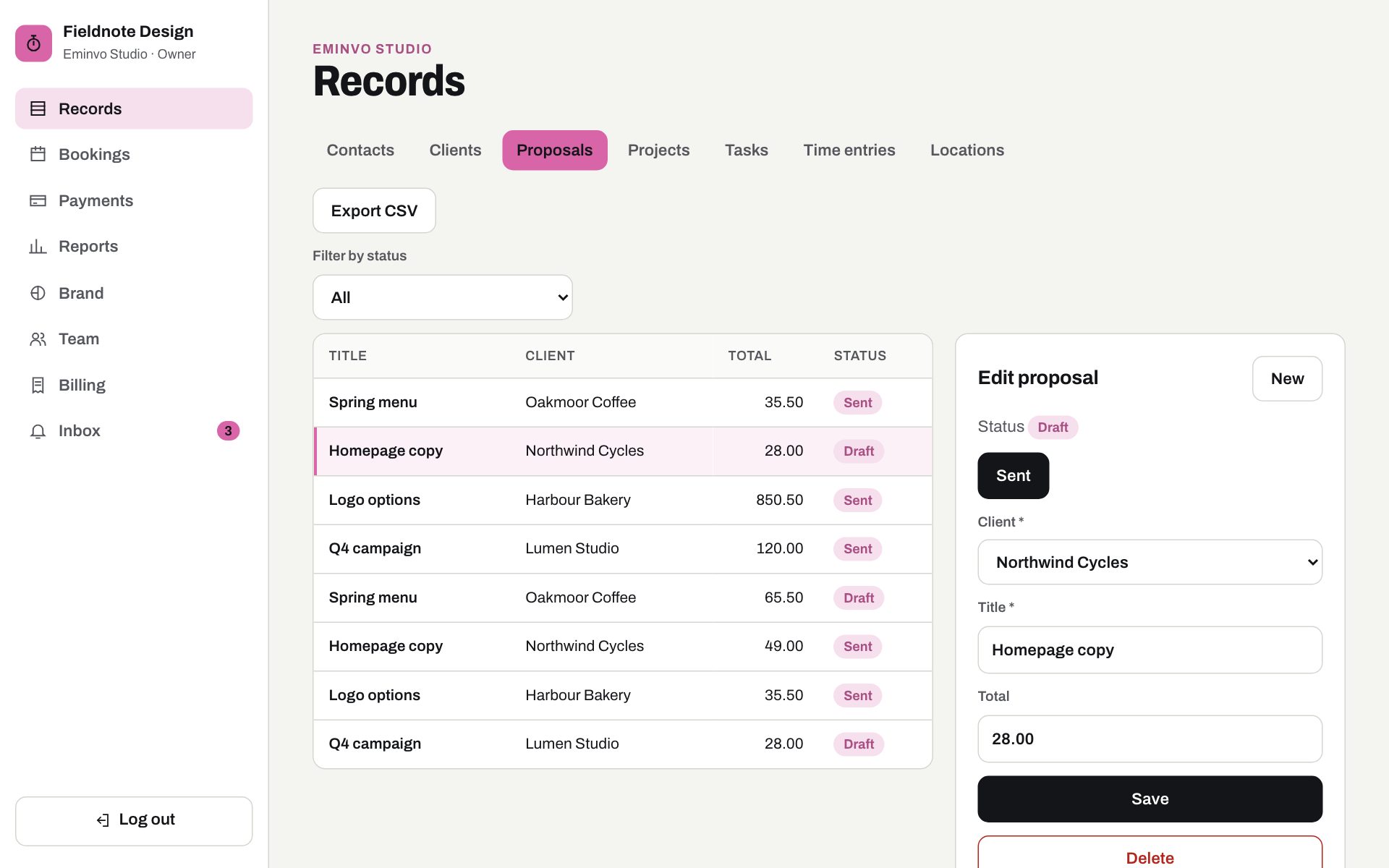
Inside Eminvo Studio.
The same screen your team will use. Scroll to walk through it.
Every record in one place.
Clients, proposals, projects, tasks and time entries in the sidebar of every Eminvo Studio account. Payments, reports, team and billing sit under them.
Your trade's words, not ours.
Eminvo Studio says clients, proposals, projects. The tabs come from the trade, not from a settings page you have to fill in first.
Every proposal with its status.
Draft, Sent, Accepted, Project active, Completed. Filter by status, export to CSV, and see at a glance what needs a decision today.
Change it without leaving the screen.
Open a proposal, move it from draft to sent, change the details or cancel it. The customer gets the message automatically.
What it handles.
The Eminvo Studio web app, with an iPhone app for staff holding the same records, reminders and booking requests.
Proposals.
Sections, line items and optional extras. The client accepts online and it becomes a project.
Three ways to bill.
Fixed price, time and materials, or retainer, each with a budget in hours or money.
Simple tasks.
List or board, assignee, due date and estimate. Deliberately simple.
Time tracking.
A timer or manual entries per task, each marked billable or not.
Invoices from the work.
Build invoices from time, milestones or the retainer, with a payment link.
Budget alerts.
Know at 80% before a project goes over.
How a day runs.
From proposal to monthly invoice.
- Draft
- Sent
- Accepted
- Project active
- Completed
Also: declined, on hold
- You send a proposal.
- The client accepts.
- A project is created with its budget.
- The team logs time.
- An 80% budget alert fires.
- A monthly invoice is built from billable time.
Reminders it sends.
- Proposal viewed or accepted
- Budget 80% and 100% used
- Task due tomorrow
- Unbilled time older than 30 days
- Invoice overdue
Who uses it.
- Owner
- Project manager
- Team member
- Clients view proposals and invoices by link
Pick a plan. See exactly what you get.
Eminvo Studio is in development; these are the prices we plan to launch with, in euros. Businesses in early access help decide what ships first.
Starter
€9/user/mo
Per month, excluding VAT. 14-day free trial, no setup fee, cancel monthly.
Request early accessIn Starter
- Unlimited projects
- 5 proposals a month
Platform limits
- For: Owner-operator, 1 location
- Locations: 1
- Staff accounts: Up to 3
- Online payments and Direct Debit
- Automations: Basic
- Reports: Standard
- Accounting integration (planned): not included
- API and webhooks (planned): not included
- SSO, audit export, dedicated onboarding (planned): not included
Business
€15/user/mo
Per month, excluding VAT. 14-day free trial, no setup fee, cancel monthly.
Request early accessIn Business
- Unlimited proposals
- Profitability reports
Platform limits
- For: Growing team
- Locations: Up to 3
- Staff accounts: Up to 15
- Online payments and Direct Debit
- Automations: Full
- Reports: Advanced + export
- Accounting integration (planned)
- API and webhooks (planned)
- SSO, audit export, dedicated onboarding (planned): not included
Enterprise
Custom
Per month, excluding VAT. Custom limits, agreed before you pay.
Request early accessIn Enterprise
- Limits agreed with you
Platform limits
- For: Chains, 5+ locations
- Locations: Custom
- Staff accounts: Unlimited
- Online payments and Direct Debit
- Automations: Full
- Reports: Custom
- Accounting integration (planned)
- API and webhooks (planned)
- SSO, audit export, dedicated onboarding (planned)
Included in every plan
- Online booking page.
- Where your trade takes bookings, customers book or request a place from a page with your name on it.
- Payments.
- Card payments and SEPA Direct Debit through Stripe, with UK Direct Debit planned. Eminvo never stores card details.
- Reminders.
- Automatic messages before things expire, fall due or start.
- Email, SMS and push.
- Messages go out the way your customers read them.
- Capacity and waitlists.
- Where places are limited, set how many a day, class or slot holds, and fill gaps from a waitlist.
- Status workflows.
- Every booking or job moves through clear steps, so nothing is half-done.
- Roles and team invites.
- Owner, manager and staff each see what they need. Invite your team by email.
- More than one location.
- Run several sites under one business, with staff scoped to their site.
- Files.
- Keep certificates, waivers and photos with the record they belong to.
- Reports and exports.
- See what's booked, paid and overdue. Export to CSV when you need to.
- Staff mobile app.
- Today's list, check-ins and updates on a phone.
- 14-day free trial.
- Paid plans will start with one. No setup fees.
Planned pricing, ex. VAT. Prices are confirmed before anyone pays.
Compare all ten productsNot in the first version.
- Resource planning
- Gantt charts
- Client portal login
Planned integrations.
- Xero
- QuickBooks
- FreeAgent
Not built yet. Listed so you can see where the product is heading.
Other trades on the same core.
Run an agency?
Tell us how you work today. Businesses in early access help decide what ships first.